Introduction
When creating any part or product, risk management is essential for delivering reliable, high-quality products. Two important tools used to identify and mitigate potential failures are Design Failure Mode and Effects Analysis (DFMEA) and Process Failure Mode and Effects Analysis (PFMEA). While they serve distinct purposes, DFMEA focusing on potential design-related issues and PFMEA targeting risks within the manufacturing process, their effectiveness is optimized when they are closely aligned.
Understanding the linkage between DFMEA and PFMEA is critical for creating a seamless transition from product design to production. This connection ensures that risks identified during the design phase are properly addressed during process planning, leading to a more robust product and efficient manufacturing process. In this blog, we’ll explore how DFMEA and PFMEA complement each other, how insights from one feed into the other, and why integrated risk management across these stages is key to operational excellence.
Understanding Design FMEA (DFMEA)
DFMEA is a proactive risk assessment tool used during the product design phase. Its primary goal is to anticipate potential failure modes in a product’s design before they reach the customer and ideally before the product even reaches production. By systematically evaluating how each component or function of a design might fail, DFMEA helps teams prioritize design improvements based on risk, ultimately leading to more robust and reliable products.
A DFMEA typically examines three main factors for each potential failure:
- Severity (S): How serious would the consequences be if this failure occurred?
- Occurrence (O): How likely is this failure to happen?
- Detection (D): How likely is it that the failure would be caught before reaching the end user?
These three scores are multiplied to calculate a Risk Priority Number (RPN), which guides teams on which risks require urgent action
A Simple Example: The Office Chair

Suppose your company is designing a chair with adjustable armrests. In your DFMEA, you might identify the following potential failure mode:
- Function: Armrest adjustment mechanism.
- Potential Failure Mode: Armrest becomes loose over time.
- Effect of Failure: User discomfort, reduced product life, possible warranty claims.
- Cause of Failure: Insufficient locking mechanism or poor material selection.
- Severity (S): 7 (discomfort and product dissatisfaction).
- Occurrence (O): 5 (moderate chance if materials are not rigorously tested).
- Detection (D): 6 (may not be detected until late-stage testing or customer feedback).
- RPN = 7 × 5 × 6 = 210
An RPN of 210 would flag this failure mode as needing attention. The design team might respond by reinforcing the locking mechanism, switching to a more durable material, or introducing additional validation tests during the prototype phase.
In the DataLyzer DFMEA format it would look like this:

Linking DFMEA to PFMEA: From Design Intent to Manufacturing Reality
Once the design phase identifies and addresses potential failure modes through DFMEA, the focus shifts to how the product will actually be made. This is where Process Failure Mode and Effects Analysis (PFMEA) comes in.
PFMEA takes the insights from DFMEA and evaluates the potential risks associated with the manufacturing and assembly processes. While DFMEA asks “What could fail in the design?”, PFMEA asks “How could we fail while building it?” The goal is to ensure that the manufacturing process can consistently produce parts that meet the design intent.
Continuing the Example: The Office Chair Armrest
Let’s revisit the adjustable armrest that showed a potential design risk due to a weak locking mechanism.
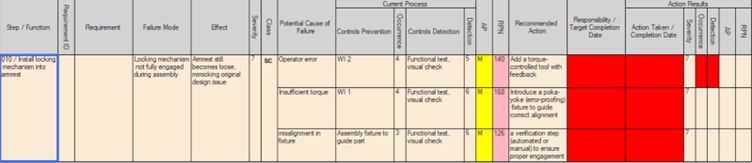
After the design is finalized with a more robust locking component, the PFMEA team looks at how this new part will be assembled on the production line. The potential process-related failure mode might look something like the below:
- Process Step: Install locking mechanism into armrest.
- Potential Failure Mode: Locking mechanism not fully engaged during assembly.
- Effect of Failure: Armrest still becomes loose, mimicking the original design issue.
- Cause: Operator error, insufficient torque, or misalignment in fixture.
- Severity (S): 7 (same impact on user experience).
- Occurrence (O): 4 (if operator training is limited).
- Detection (D): 5 (visual inspection may not catch incomplete engagement).
- RPN = 7 × 4 × 5 = 140
Even though the design issue was resolved, the PFMEA reveals that the production process could reintroduce a similar failure if not properly controlled.
To mitigate this, the team might introduce:
- A torque-controlled tool with feedback.
- A poka-yoke (error-proofing) fixture to guide correct alignment.
- And a verification step (automated or manual) to ensure proper engagement.
In the FMEA form this would look like this:
Mapping DFMEA to PFMEA: Column-by-Column Linkage
Although DFMEA and PFMEA serve different stages of product development, they share a common methodology. More importantly, certain outputs of the DFMEA become critical inputs to the PFMEA, ensuring design risks are addressed in manufacturing.
Here’s how key DFMEA columns influence the structure and content of the PFMEA:

Bridging the Gap: Why This Mapping Matters
Understanding this flow helps cross-functional teams—engineering, quality, and manufacturing—speak the same language and track risks across the product lifecycle. Without this connection, there’s a danger of losing critical insights during the transition from design to production, potentially leading to repeat issues, warranty claims, or safety risks.
A well-integrated DFMEA-to-PFMEA process doesn’t just reduce risk, it fosters collaboration, increases efficiency, and strengthens overall product quality.
Design FMEA and Process FMEA are not meant to be islands. When these tools are connected thoughtfully, they create a powerful feedback loop between product design and manufacturing, significantly reducing the risk of failure, improving quality, and boosting customer satisfaction.
As we’ve explored, DFMEA identifies what could go wrong in a product’s design, while PFMEA focuses on how the process of building that product might fail. The most effective organizations treat them as part of a continuous risk management process, not separate checkboxes.
Actionable Tips for Better Integration
- Establish a Cross-Functional Team Early
Involve design, manufacturing, quality, and supplier representatives in DFMEA discussions so process realities are already considered when risks are first identified. - Use a Common Template or Software Tool
Ensure that DFMEA and PFMEA use consistent terminology, risk criteria, and version control. Integrated FMEA platforms can help maintain traceability between related failure modes. - Carry Over Critical Risks from DFMEA to PFMEA
Don’t treat PFMEA as a fresh start. Use the DFMEA output, especially high-severity risks, as a starting point to evaluate how process failures might reintroduce those risks. - Map Functions to Process Steps
Create a traceable link between what the product must do (DFMEA) and how each process step ensures that function is achieved (PFMEA). This ensures nothing gets lost in the handoff. - Review Both Together During Design Reviews and Process Sign-offs
Make DFMEA and PFMEA review a joint checkpoint. This helps detect gaps and verify that risks addressed in design are not reintroduced by the process. - Update FMEAs Together Over Time
As changes occur—whether in design or production—update both documents accordingly. Keeping them aligned ensures continuity of risk control throughout the product lifecycle.
By integrating DFMEA and PFMEA intentionally and early, teams can bridge the gap between engineering and operations, reduce the cost of quality issues, and ultimately deliver better, more reliable products to market.