Causes of variation
When we implement SPC, we normally apply SPC on the output of a process. In case of an out-of-control, we look for the cause of the out-of-control in the inputs or in the process itself.

Figure 1: SPC implementation
Based on root cause analysis, we continuously improve all sources of variation according to the 5 M’s (Men, Machine, Method, Measurements and the last category, Materials).
The first three categories are mostly found within our company, but if material is the cause of unwanted variation, we need to work with our suppliers to reduce variation in their processes.
Implementing SPC and starting a process of continuous improvement is already a challenge, but starting the same process with all suppliers is even more challenging.
Controlling variation is not only important for quality but also for productivity. In our highly automated manufacturing lines variation in incoming material could lead to unacceptable downtime and disturbances.
Getting the right information from your suppliers is becoming more important if we are going to use real time AI models. These real time AI models need to include all contributing factors and some of these factors might be in the material.
Over the years DataLyzer has worked with several customers to improve the variation in the supply chain. In this document we will explain some of the obstacles and how they were solved.
We will show three different methods ranging from the most integrated to the least integrated.
Method 1: Integrated webbased SPC solution
In DataLyzer Qualis, you can setup a database with all internal processes but also all supplier processes. For each supplier you can setup a logical screen (“Satellite”) which is exclusively accessible by that supplier through a browser and the internet. Using authorization, access for that supplier can be limited to only their part of the SPC system.
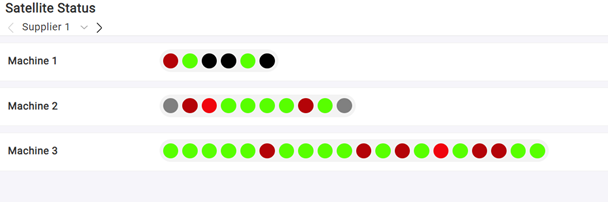
Figure 2: Webbased Satellite dashboard
All advanced SPC features like changeovers, dashboards and alerts etc. are available for the supplier but only for their data.
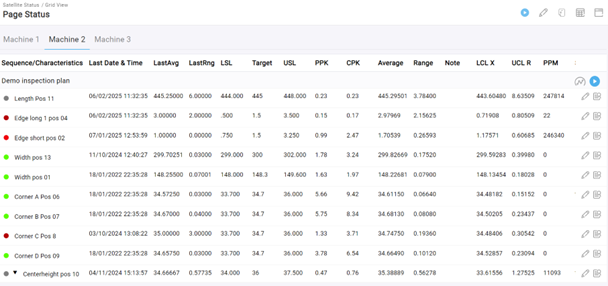
Figure 3: Detailed overview per machine
Because all data entry can be combined with full tracking and tracing information the customer will know what variation to expect even before a shipment is made, so the customer can anticipate how to handle this variation.
Although this is the most advanced solution, there are a few potential problems:
- Internet connection is not always 100% reliable, for example with suppliers in China this may be a challenge.
- Suppliers already have their own QMS or SPC system and might be reluctant to enter that information into another system or are reluctant to provide the level of detail requested.
Ad 1: In this example case we have implemented a solution for a major manufacturer using a technique called merger replication provided by Microsoft in SQL Server. The SPC system is set-up and maintained by the customer and 12 suppliers located worldwide enter the information in the DataLyzer SPC system. But all suppliers can work on their local database which means if internet access is interrupted, they can continue to enter data. The moment the internet is restored SQL server will merge the databases across the globe and synchronize all information. This means uninterrupted operational SPC at all suppliers and the customer has real time insight.
Ad 2: In this case we have to exchange information between the supplier and the customer. Some challenges and how they can be solved are shown in the second method.
Method 2: Process variation data exchange
In this method we would like the supplier to provide us with data about their upcoming shipments. The problem here is that data is often unstructured and requires a lot of manual processing before it can be used.
Consider getting certificates from all over the world in different languages and formats. How do you process that information in a logical way?
Detailed data on a shipment can vary from a few to thousands of measurements. So, in this case a few things become important:
- The system needs to be effective and should work fully automatically without manual processing or correcting.
- Data should be aggregated so, with a minimum amount of data, we still have a good idea of what the variation in the next shipment will be.
- The exchange format should be generic so it can be used with all suppliers.
- Data cannot be send by email because of IT restrictions. An automatic data exchange option should be provided.
To make data exchange possible in an automated environment you need to use XML or Excel formats. Because every supplier is capable of exchanging data in Excel this format is commonly chosen to exchange data.
Firstly, you need to define a standardized format.
You cannot, for example use an identification of a characteristic based on a name or a position in the file. Names will change over time or foreign suppliers need to work with their local description. Position in a file will also not work. For example, a gage is broken and that characteristic will not be measured. This means if data is sent there is a large chance that the order of the characteristics will change and incorrect data will be imported.
So, the first step is to get a standardized list of quality characteristics all defined by a unique number.

Figure 4: Standardized list of quality characteristics
In Figure 4, you see an example of data collected. The number is unique in a sense that for every supplier in the supply chain the “Characteristic 1” (e.g. Length) is identified by 101 no matter what supplier or language.
With the results provided this file can be imported directly into the Qualis SPC system and the control charts for every characteristic will indicate if potential problems may occur with that shipment.
All data for a characteristic can be shown in four charts (characteristic, %OOS, Pp and Ppk). In the header, tracking and tracing data will be added like such as supplier, product, production line, etc., so data can be written to the correct control charts.
This data exchange works fully automatically at the customer’s site. Data will be uploaded by the supplier to an FTP site and from there the data will be automatically imported after Excel files are scanned for security.
Using method 2 offers the option to monitor variation at each supplier where the system is easy for the supplier. They only need to provide a certificate in a standardized Excel format.
When method 2 is not possible or not available yet, the only solution is to do the analysis afterwards to get an idea of how the variation at the supplier influences the process.
Method 3: Off-line data analysis
Let’s assume we have a problem within a production batch. During root cause analysis there is a suspicion that incoming material is causing variation. Looking at the information in the certificate of analysis provided by the supplier we see some abnormal values for certain quality characteristics.
But based on the abnormal values it is risky to draw a conclusion that this is the root cause. You need to validate by reviewing historical data to see if there is a correlation between the quality characteristics in the material and the problems found. The material may come from a supplier but also may be coming from an internal process without a clear identification.
Consider a mixing process at a food processing company. After the batch is ready the dough must rest for 90 minutes before it is loaded onto the production line. The production line is a continuous process. We want to check if settings in the mixing process are influencing the quality characteristics measured at the end of the line where the line has a throughput time of approximately 30 minutes. When quality is measured at the end of the line there is no batch identification for a given mixer.
To solve this kind of complex root cause analysis, DataLyzer offers a tool called Qualis Wizard. In this tool you can join data from multiple sources. Data can be taken from DataLyzer, but also from any external source like Excel, databases and historian etc. Data can now be joined based on an identifier or based on time differences.
In the example above when a batch is loaded on the line, we record the batch number and the time stamp. We can now join the measurements of the mixer with the quality data from the production line 120 minutes later and ask for a full analysis of the data to see if there is a major factor in the mixing process influencing the quality.
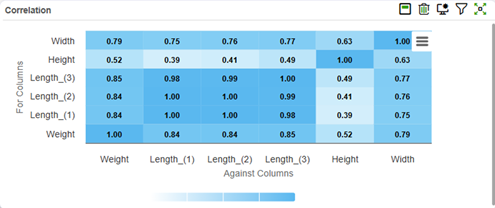
Figure 5: Regression analysis
In Qualis Wizard we now have several tools available such as regression analysis (Figure 5), scattergram, multivari, F and t tests, random forest analysis (AI) and, of course, control charts. Based on these analysis we might get ideas of which product characteristics of suppliers should be controlled with SPC and we can move in the direction of method 2 or even method 1.
Conclusion: Ignoring Supplier Data Could Be Costing You Quality and Productivity
During an SPC implementation you need to consider how to process supplier information at an early stage of the project. Not because material variation is always the most important factor but it might be an important or even critical factor and it takes time to get the cooperation of all suppliers.
Ignoring supplier information can be like driving a car with frosted windows in the wintertime and you only cleared the front window: It’s possible to drive but why take the risk?
Discover how the DataLyzer Qualis SPC software can help you monitor, control and improve your production processes. Our team of experts is ready to show you how our web-based solution can be tailored to your specific production needs.