Managing the number of out of controls during the implementation phase of an Statistical Process Control (SPC) implementation
In SPC theory, control charts are used in the product and process development phase to analyze processes and when the process is in control for both the average and range chart, the process can be released for use in production. In practice however SPC is often introduced in an existing production environment where not all processes are in control and fully capable.
During the first phases of implementation of SPC, the activities and responsibilities should be clearly established. In the first loop / control loop the operator will take subgroups and needs to address out of controls of the process following an out of control action (OCAP) plan. When the operator is not capable of handling the out of control in the first loop or a preventive action is required, the second level / improvement loop should be activated. In this loop, responsible production management or engineering takes appropriate actions to avoid reoccurrence of the problem.
In modern production systems there is not much overcapacity of operators and engineers so the time to work on out of control action plans and improvement activities as a result of out of controls is limited. This requires that clear priorities need to be set by management so that
operators, production management and engineers will address the right problems. This third loop is called the planning loop.

Figure 1: Organization of SPC
During the implementation of (DataLyzer) SPC, organizations have problems managing the amount of out of controls in the early stages. The large amount of out of controls are caused by several reasons:
- Processes are out of control. In the early stages of an SPC implementation control charts typically show a large percentage of the subgroups out of control. Examples of out of controls in the early stages are incorrect measurements and over adjustment of the process by operators.
- When SPC software is used you often see a quick growth of the number of control charts. Control limits are calculated automatically and therefore every disturbance in the process will lead to an out of control signal. For example automatic importing data from a CMM or IOT can create thousands of charts and subgroups in a short period of time.
- Characteristics are often not classified in the beginning so all control charts get the same priority while some charts are extremely important and other charts are only used as help for calculations and are of no importance at all. A typical classification in order of priority would come from an FMEA analysis.
- In a lot of production environments the process average is unstable. Examples are tool ware, setup differences, differences in raw material, machine warm-up or differences in a chemical bath over time. All these situations will show out of control points on the average chart and in not all situations it is possible or economically feasible to bring the process average in control. Instability of the process average will be visible by a large difference between Cp and Pp (e.g. Pp/Cp > 1,25).
- A last but important reason is that the control limit calculations where established in early 1900’s when we had no computers available. So the 3 sigma rule is a compromise between acting too late and acting too soon. In practice is means with a stable process approx. 0.3% of the subgroups are out of control per chart without having an assignable cause. So with a XR chart 0.6% will be out of control if the process is 100% stable. This worked perfectly when we took 1 subgroup per 30 minutes with pen and paper. Nowadays we take a large number of subgroups with automatic data collection (CMM, PLC etc). If we for example take 500 subgroups in a shift and the process would be 100% stable we would get 3 out of controls. A complex aerospace product has easily 700 characteristics so if everything is perfect and we create control charts of all dimensions we would have approx. 4 out of controls in every CMM measurement if we apply the standard SPC rules required in RM13006.
Too many out of control points is one of the most important reasons why SPC implementations fail. If you have 30 out of control points in a shift and you only have time to address 3 or 4 then your SPC implementation is about to fail. You should never have more out of control points than you are able to address. The result of having more points is that nothing is done with the majority of out of controls and that is the worst signal you can give to operators how serious you are about quality.
There are three ways to address the problem of too many out of controls (in the early stages):
- Reduce the amount of control charts and only use charts for the few really critical quality characteristics.
- Use control charts for all quality characteristics but widen the control limits of the average chart for non-critical quality characteristics
- Ignore out of controls when Ppk is high
The advantage of the first option is that SPC will be used as it is intended. The disadvantage is that severe quality problem can appear on quality characteristics which are not monitored and that limited data is available for further analysis of the process and for reporting to customers and management.
The advantage of the second option is that all quality data is monitored and can be used for analysis and reporting. The disadvantage is that more effort and knowledge is required to manage the control charts and the calculation of the control limits.
The third option is a very effective way to reduce the number of out of controls quickly. For example if a Ppk > 3 we choose to ignore the out of control alerts.
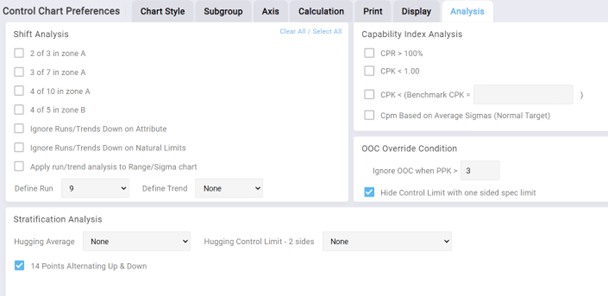
Figure 2: OOC override condition setup
The idea behind the third option is that when specifications are correct an out of control with a Ppk of 3 will have no impact on the product quality which means the effort of the improvement process in SPC is automatically focusing on quality characteristics with a lower Ppk. If an out of control leads to much variation the Ppk will automatically reduce and become below the threshold and the issue will be noticed.
We are not recommending that this is always the right approach but to manage the amount of out of controls this is a very simple and effective step. Later you can change the value to a higher Ppk or eliminate this override completely or combine it with the second option of widening the control limits.
In this blog an approach for the second option will be presented which can be used to manage your control charts during the implementation phase.
Calculation of Control Limits during the SPC Implementation Phase
In the start of an SPC implementation all efforts must be aimed at controlling the variation of the dispersion (range or sigma chart) when subgroupsize is larger than 1. When the dispersion of the process is out of control the average of the process will likely also go out of control. This is caused because there is a relation between the variation in the dispersion and the variation of the average:

People should become aware that the dispersion chart is the most important chart and problems on this chart should be addressed first. When control limits on the average chart are calculated in the standard way, out of controls on the dispersion chart will also lead to out of controls on the average chart. These out of controls on the average chart are not an indication of changes in the process average but are a logical result of changes in the dispersion. When operators without proper knowledge of SPC will see out of controls on both average and dispersion chart they will likely start working on the “problem” on the average chart because problems on the average chart are easier to address: just adjust the process.
The way to avoid these problems is to start charting without putting the limits of the average chart at 3 “sigma”. During this phase there are 3 options:
- Don’t use control limits for the average at all. Only show the target. This is sometimes called a run chart.
- Fix the limits at a level which will rarely lead to out of controls eg 4 sigma
- When the process average is unstable use modified control limits to minimize the actions but make sure that process averages which are abnormal are signaled.
When the Cp value is high enough the third method is preferred because the limits are still calculated based on the process variation and it will still give an early warning when a disturbance of the process average will lead to defective products.
How to calculate the Modified Control Limits:
When the process average fluctuates we can allow a certain amount of fluctuation before we start looking for the cause as long as a required Cpk value is still achieved. We can set the control limits at a level that the Cpk is higher than a required value. In other words the distance between USL and the process average should be higher than ((Required Cpk * 3) ∧σ).

Figure 3: Example of modified control limits for the average chart
In figure 3 the dotted red line are the control limits calculated in the standard way. The red lines are the modified control limits based on a required Cpk value of 1,67. For the example we have shown the (yellow) specification limits. Normally we recommend not to show the specification limits.
The modified control limits can be calculated as follows:
The process average is allowed to shift to a level where the distance between the USL and the process average is (Required Cpk *3∧σ). The distance between the average and the control limit is:

This means the distance between USL and the modified upper control limit is:

The requirement for using this formula is that the Cp value of the process is higher than the required Cpk. If that is not the case the modified control limits will be too close to the process average resulting in false alarms.
The modified control limits can be calculated using DataLyzer SPC softare. When calculating modified control limits in DataLyzer SPC you can enter a required Cpk value and you will get a warning if the required Cpk value exceeds the Cp value. Based on these values the limits can be set in DataLyzer.
Final Remark
The purpose of this blog is certainly not to recommend to use modified control limits under all circumstances. If you want to find special causes of variation we recommend to calculate the control limits in the standard way. Overriding out of controls, widening limits and using modified control limits are only recommended as a method to distinguish between priorities of the different characteristics.
If we don’t set priorities correctly using the methods above we put the problem to the operator and the operator is certainly not capable of solving the problem of too many alarms.
Discover how the DataLyzer Qualis SPC software can help you monitor, control and improve your production processes. Our team of experts is ready to show you how our web-based solution can be tailored to your specific production needs.