Introduction
Zero defects is the aim of quality improvement in the Aerospace Industry. No explanation for the need of quality should be necessary. The consequences of failure can be catastrophic. Luckily there are tools available to help achieve Zero Defects. An essential tool is ‘Failure Mode and Effect Analysis.’
In this blog we will discuss Design FMEA, Process FMEA and Control Plan as tools to achieve Zero Defects. .
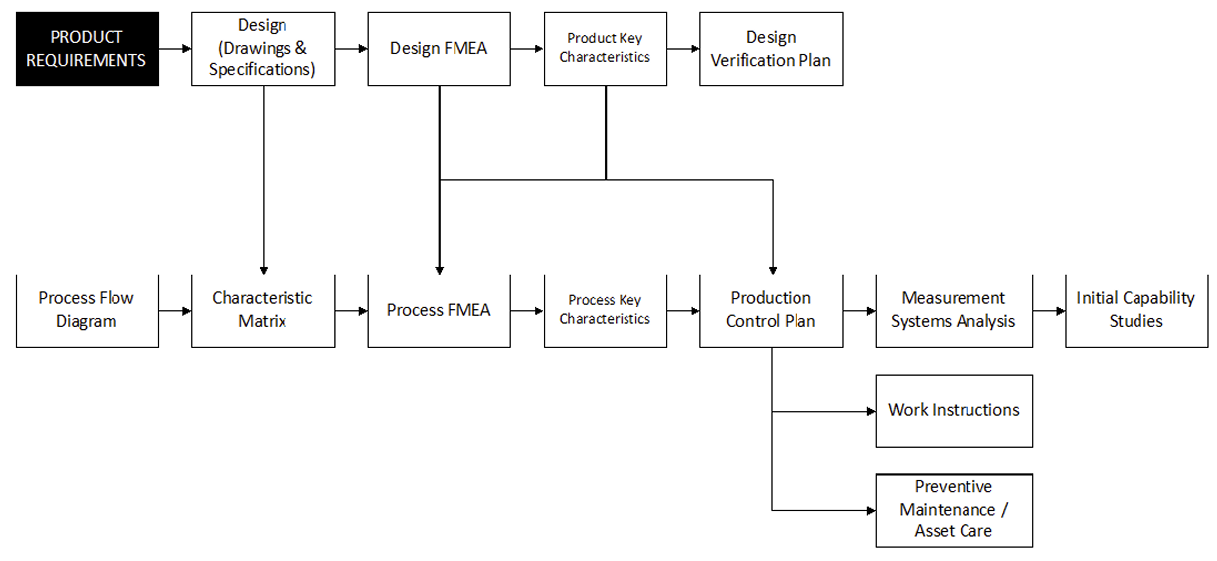
Figure 1: Quality tools relationship, taken from RM13004, p. 14
To be efficient as well as effective in the FMEA process it is important to consider Reference FMEAs as building blocks for the creation of new FMEAs. A Reference FMEA contains your lessons-learned and company knowledge of your processes. They are an important starting
point for any new FMEA in development.
For Design and Process FMEAs to be effective they must:
– Be product specific (system/ sub-system/ module/ part number)
– Consider all design characteristics on the drawing and related specifications.
– The PFMEA must include all process steps from Receipt to Dispatch, where the product is transformed (be it intentionally or unintentionally)
– Include Actions to improve control of failure modes with a high severity and occurrence risk.
To ensure efficiency for the PFMEA and Control Plan you should:
– Create Part Number PFMEAs using Reference FMEAs
– Create Reference FMEAs and PFMEAs in a dedicated software tool (RM13004, page 11).
– Plan to continually update Design and Process FMEAs to reduce overall process risks.
Design FMEA (DFMEA)
A DFMEA evaluates how the Design may fail to develop a Product that meets the Functional Requirements of the Customer.
It’s a systematic approach to:
1. find and evaluate potential functional failures and the effects and design related causes of those failures
2. identify actions to eliminate or reduce the chance of those failures occurring
3. document the management of the design risks
The DFMEA addresses the design intent and assumes the design will be produced and assembled to this intent. It doesn’t rely on manufacturing process control to overcome potential design weaknesses, but it does take into account the technical/ physical limits of the manufacturing/ assembly process. As an analytical engineering tool the DFMEA records the ideas and concerns of the design team, it is therefore understood that failures shown in the DFMEA are potential, they may or may not occur.
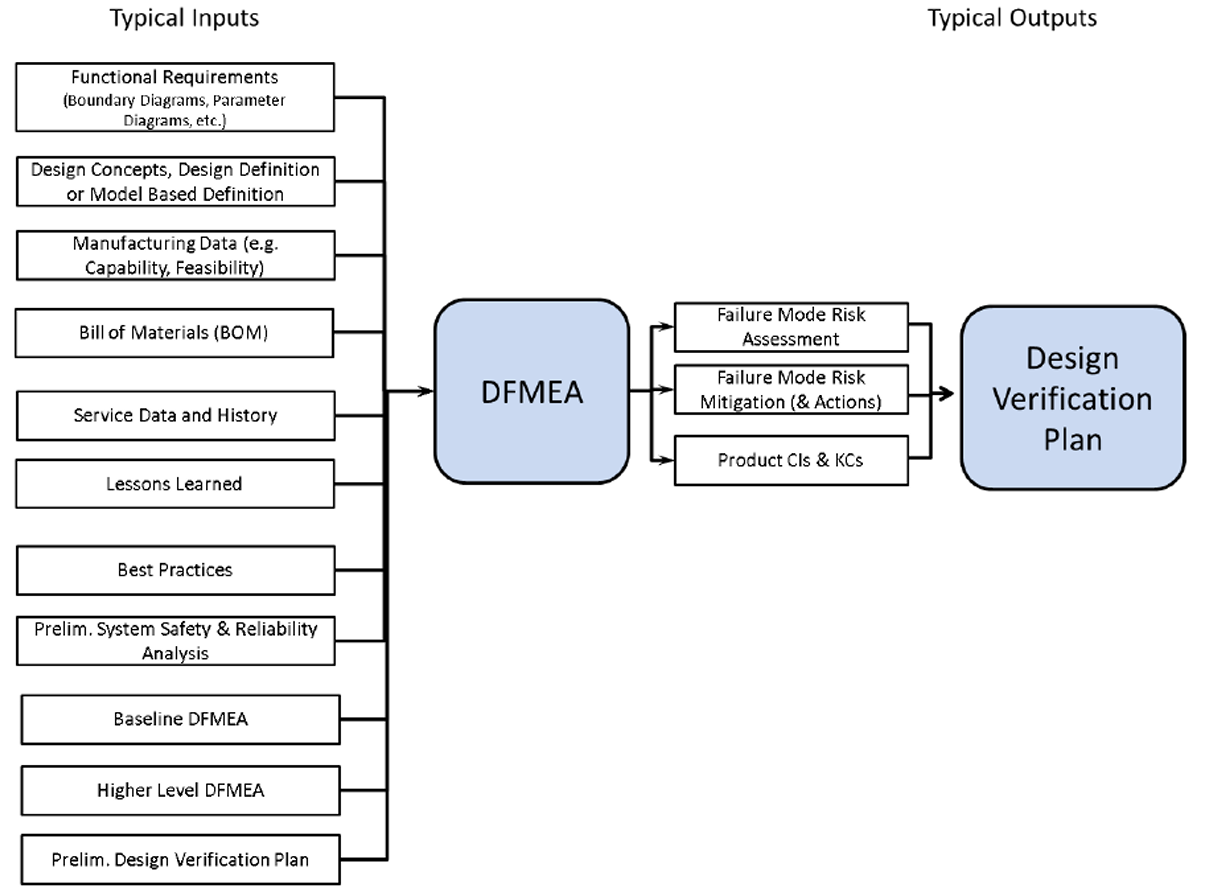
Figure 2: DFMEA typical inputs and outputs, from RM13004 p. 23
One of the most common mistakes in the FMEA process is having one individual making the FMEA. For any FMEA to be effective and efficient a cross functional team is required. It is also recommended that an impartial facilitator (trained in DFMEA methods) supports the DFMEA activity.
The scope of the DFMEA is defined by a tool such as a boundary diagram, interface diagram, structure tree or something similar, which will highlight the elements that will be analyzed. Important is that the tool can illustrate the relationship between elements and help establish a
logical order to the DFMEA. The diagrams used in preparation should be referred to in the DFMEA.
The DFMEA team should produce outputs such as:
– Failure mode risk assessment
– Failure mode risk mitigation
– DFMEA document(s)
The DFMEA outputs will feed activities such as:
– Design Verification Plan
– Process FMEA
– Service Engineering
– Program Risk Management
– Safety & Reliability Assessment
Below image shows an example DFMEA in the DataLyzer FMEA software.

Process Flow Diagram
Before we can start developing the PFMEA, we need to consider the activities necessary to create and assemble the product. The PFMEA will include all operations that we list in the Flow Chart. We do not need to take processes for purchased materials, components and assemblies into account. The supplier is expected to define these in their process flow. There are two general methods for creating a flow chart. There is a graphical flow, which uses symbols to indicate the type of operation.

Figure 4: Flow Chart example from RM 13004 p. 48
Columns for Inputs, Outputs, and Controls are not mandatory, but they are considered good practice. The Characteristics Matrix will also include the operations in the order of where the feature is created, and the Control Plan will detail how the requirements will be controlled. However, time spent on the Flow Chart is direct input for the PFMEA and CP, so it is beneficial to be as complete as possible in this phase.
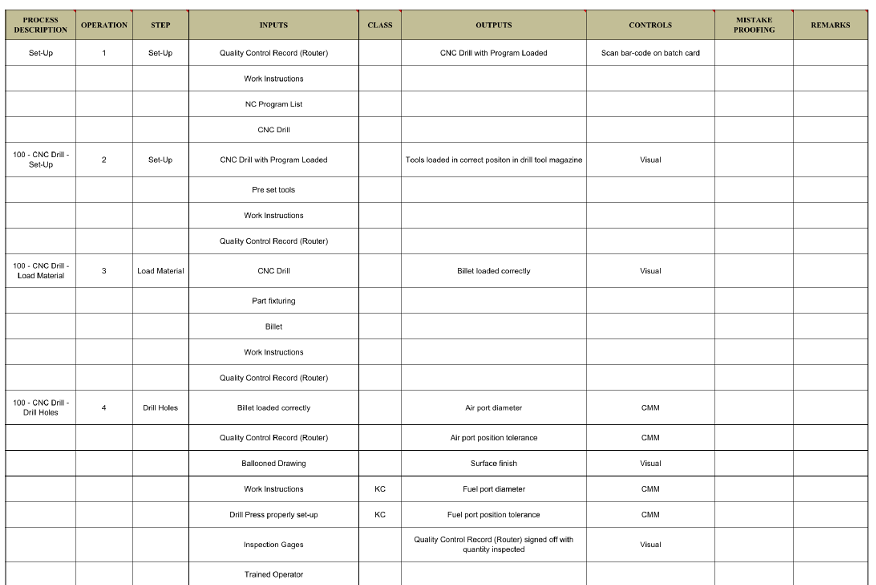
Figure 5: Flow Chart example RM13004, p. 49
Details of the steps within each operation will be used in the PFMEA based on risk. The PFMEA focuses on the steps that actually modify the product (intentionally or unintentionally). Some steps from the flow might not be detailed in the PFMEA. That does not mean they are not
considered elsewhere in the FMEA, usually they are considered Causes of Failure instead of Requirements or Failure Modes. Inspection operations are only listed as Detection Controls, unless the inspection operation could potentially unintentionally transform the product, damage it for example.
So in conclusion, all steps that transform the product, whether this is intentionally or unintentionally need to be included. There will be some that can be left out based on risk. The evaluation of the inspection process capability is done through Measurement System Analysis.
Process FMEA (PFMEA)
The Characteristics Matrix is one of the most important inputs for the FMEA. It is a way to visualize the relationship between operations and the features created at that operation. This matrix lists where features are created, inspected and it also highlights operations which can
affect features that were created at earlier operations.
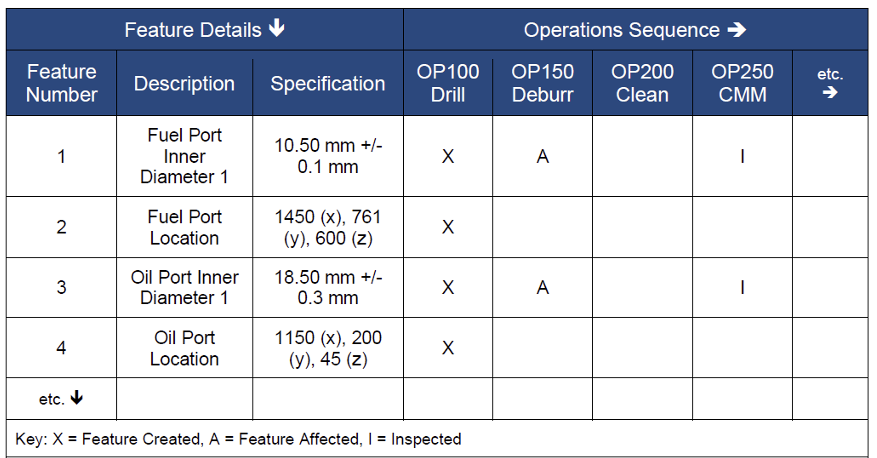
Figure 6: Characteristics Matrix RM13004, p. 52
The Process FMEA will evaluate every feature and specification required defined by the product design. The question to ask here is ‘What are the potential ways I can make this wrong?’. The team will then use the FMEA methodology to understand the potential impact on the customer and the business if the product is made wrong. From the Failure Modes the team will the determine how these failures can occur (Causes). When we know what causes the failures, we can think about ways to prevent them from occurring, and detecting what we cannot prevent. After calculating the Risk Priority Number for each Failure Mode, the team can use their judgement to determine whether improvement actions to lower the RPN score are required. As mentioned before, this is a team effort. The team needs to be cross-functional, but not every function needs to be present for every meeting. The FMEA Facilitator should make sure that right people are present.
For the PFMEA to be effective it must take into account all the features/ characteristics on the design drawing with related specifications, and consider all process steps where the product is changed. There are several inputs required when building the FMEA, and there are several outputs from the PFMEA.

Figure 7: PFMEA inputs & outputs, RM13004 p. 55
Another useful input is Reference FMEAs. Reference FMEAs are re-usable building blocks. Reference FMEAs are not a cut and paste solution. They contain generalized process information, which will be added to in the specific FMEA. Typically the specification and tolerance, S,O,D scores, effects and actions are left open in the reference. This is information that will be added in the specific FMEA. The use of reference FMEAs will make sharing of information between plants much easier. Also the creation of new FMEAs will be much faster and more efficient when Reference FMEAs are in place. The image below gives an indication of where the information comes from.

Figure 8: The PFMEA and it’s typical data sources, RM13004, p. 55
One of the most important rules when entering information into the actual FMEA form is to keep all descriptions as clear as possible. These documents will be used for many years, maybe up to 20 years or more, and it is imperative that engineers who were not involved in the creation of the PFMEA to understand everything that is included.
Besides RPN there are other ways to evaluate risk priority. Sometimes only Severity x Occurrence is used, there are grid tables which you can find online, or using Action Priority from the AIAG VDA manual. Combining AP with RPN will allow you to have a clear view of how to prioritize. See the example below. One of the key points to keep in mind is that the FMEA is not finished when we have calculated RPN and/ AP. Based on RPN scores, AP and Severity we need to set up improvement actions. What further action can we take to reduce the RPN of these items through ideally, eliminate the Failure Mode, but if that is not possible we improve the Occurrence of the Failure Cause and Detection of the Failure Mode. Bear in mind that there is no set way of knowing which high RPNs will be addressed. You will have to use your judgement. Some companies use an RPN threshold to select which RPNs to address, but beware setting this threshold too low. When every other item in the FMEA has an RPN above the threshold, the teams often considering lowering the score to begin with, without actually trying to improve. Keep in mind that the continual reduction of the overall risk is what we are aiming for, and this is why we are using the FMEAs as living documents. This is an ongoing process that never stops.
After documenting improvement actions in the FMEA they should be implemented, and verified. It is good practice to add proof of improvement to the taken actions. Last but not least, we need to recalculate the RPN. Usually this concludes this revision of the PFMEA. It should be locked, and kept as historical data, but there should be a new draft version of the document created to continue this ongoing improvement process.
Control Plan
The Control Plan describes controls from receiving until the products leave the facility. It needs to include all design requirements as well as those from the DFMEA and PFMEA. The aim is to control the sources of variation of the product as well as the process. Same as the FMEA this is a living document, and it should be updated when changes to the process or process capability are made. One of the key points of the Control Plan is that is should be linked to the PFMEA.

Figure 9: Typical inputs for a production Control Plan, RM13004, p. 116
The Control Plan is traditionally used in the 3 stages of the Product Life Cycle;
1. Prototype: inspections and tests to be carried out at the prototype stage
2. Pre-launch: product verification processes, used as part of APQP and PPAP to validate product meets design intent
3. Production: checks required of the product and process during normal production to ensure a conforming product through control of sources of variation.
The Control Plan is a description of what the operator must do during production. It should remain an easy to read, simple document. Features created at one operation, that are not inspected until a later process step will be added to the step where they are inspected instead of where they are created. Controls and Reaction Plans specified in the Control Plan will be documented in a work instruction and/ or Inspection Plan. The purpose of the Control Plan is to be a quick reference guide for the operator, so together with work instructions the CP is a key production reference. It defines what needs to be controlled as identified in the FMEA. So there should be a clear link between the FMEA and the CP. Changes are driven by the FMEA. Therefore in DataLyzer FMEA we link the Operation,Step and Function column between the documents.
In the Control Plan the first 3 columns have red text, this is an indication that this information is linked to another document, in the below example it is linked to the PFMEA. We go further than that, we also copy some information from the PFMEA to the Control Plan. In the below example the Product Characteristic, Classification symbol and Control Method are all copied directly from the FMEA to the CP. This way you prevent errors as well as discrepancies between the documents. Below image shows an example of a Linked Control Plan in DataLyzer FMEA.

Conclusion
The difficulty in implementing effective and efficient FMEAs can be found in 3 major areas:
1. Lack of knowledge/ how to
2. Not part of continuous improvement cycle
3. No link between the different documents
A dedicated software tool like DataLyzer FMEA, can help you build the company knowledge using reference FMEAs which can easily be used to create FMEAs for new Products based on familiar Processes. This will also help build a historical database of failures, to prevent them from happening again. While a software tool will not teach you how to create effective and efficient FMEAs, it will help you keep them in a structured database, and allows you to keep examples, as well as hints in the FMEA form to help instruct and guide new users. It also helps to exchange information between different locations. Software will also help you keep track of open Actions, to ensure they are implemented, and are actually effective in improving the risk scores.
DataLyzer FMEA has an integrated Notification module, which automatically sends out e-mail alerts when Actions are almost due. The Notification module can also be used to automatically send out an e-mail when a document has not been opened for a set period of time, to make sure it is evaluated repeatedly. Maintaining FMEAs in Excel – as has been the standard for many years-, means hours of manually linking your documents and typing and retyping all requirements. Dedicated software tools will help you to automatically maintain this link and forward this information, instead of having to go through all your documents to make sure steps and processes are aligned. DataLyzer is capable of linking DFMEA, Flow Chart, PFMEA and Control Plan.
Discover how DataLyzer FMEA can help you implementing efficient Process Flows, FMEAs and Control PLans and therefore streamline your quality control processes and reduce scrap and rework costs. Our team of experts is ready to show you how our solution can be tailored to your specific production needs.