50+ countries
Global use, local impact

47 years in business
Originated in 1979

50+ employees
Europe, USA and Asia

2000+ customers
More than 20.000 users
Is Excel the right tool to implement Statistical Process Control?
Introduction
As a manufacturing or quality manager you are constantly answering to customers, leading mandatory audits, staying on top of your suppliers, among a thousand other daily tasks required to keep the equipment producing quality products. Now you are asked to find value from your Excel or paper check sheets in an effort to increase quality and decrease costs. You think of terms like defect pareto, Cpk, control limits, and real-time alerts. Where do you look to begin your quest for actionable information from your spreadsheets and filing cabinets? Excel, of course! Right? Let the following information help steer you away from a very time-consuming and complicated road of statistical process control (SPC) with Microsoft Excel. I have outlined four major pitfalls.
Audit Compliance
You can attempt to compile data from multiple sources into consolidated Excel documents but, ultimately, these documents that you create to compare lot numbers, production runs, first article inspections, and create process capability studies do not hold up in quality audits. The individual paper check sheets or original Excel documents are required for regulatory purposes. Ideally, the same spreadsheets you use for advanced analysis would simply contain the original operator-entered data and hold up to audits.
Some industries also require electronic signatures and automated timestamping of operator-entered data. These are shortcomings of SPC in Excel. Only purpose-built SPC software can fully comply with 21 CFR Part 11. Medical device companies, for example, require that all quality data be linked to an electronic signature of the operator or technician. Other policies such as data edit controls may also be necessary to safeguard data. Audit trails and transaction history may also be mandatory. Excel simply falls short.
A SPC solution should include all necessary functionality to meet 21 CFR Part 11 compliance. It should also include tools to manage user roles and permissions to ensure that only certain personnel can perform defined actions.
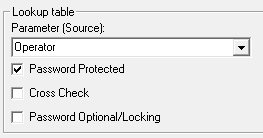
Figure 1: Requiring digital signatures for each data entry is required for 21 CFR Part 11 compliance.
Ease of Use
Operators require a simple data-entry solution so they can focus on keeping equipment running and responding to non-conformities during production. Purposed-built SPC solutions can provide simple role-based user interfaces that display only the information and responsibilities of each user. This is key to user acceptance of a SPC solution. Many Excel-based systems require a complicated network directory to store an endless number of files. Training the operators on how to find and properly organize Excel documents can be challenging enough.
Purpose-built SPC software can also provide statistical alarms and real-time event notifications without the need to present control charts or statistical information to the operators. Further, pre-defined lists of linked cause and action codes can be presented to the operator when a statistical or specification limit violation occurs making it clear what the operator’s responsibility is when an alarm occurs.

Figure 2: Simple, intuitive screens and notifications are key to operator adoption.
Data is coming more and more from external sources (CMM, Camera’s, PLC, IT/OT interfaces) and need to be presented to the operator in real time. This is impossible in Excel.
Centralized Databases
Excel or Excel based SPC solutions like Analyse It, SPC for Excel, QI Macros etc are simply too limited in file size and record limits to be used as a central repository for statistical and quality data leaving you and your IT department with the never-ending task, of organization, archiving, and safeguarding hundreds, if not thousands, of Excel documents.
The same is applicable for Minitab if you use sheets. What you really need is a centralized, secure, and scalable solution. A modern database can very easily be managed, automatically backed up, and fully scalable as data records grow over time or if other production areas, or sites, are added to the system. A back-end database also enables individuals within your organization to view information in real-time as operators are entering data while providing a one-stop shop for historical records, comparative analysis, audit readiness, and alerts. Tracking and tracing parameters such as lot numbers, product codes, machine IDs, operator info., etc. can be made mandatory so issues can be identified appropriately. Lists of tracking and tracing information can be easily maintained and linked to the appropriate parts and characteristics.
A database also provides a means of integrating with other parallel production and quality systems such as historians, MES or ERP systems, and machine networks. Integration is very difficult, if not impossible, in Excel.
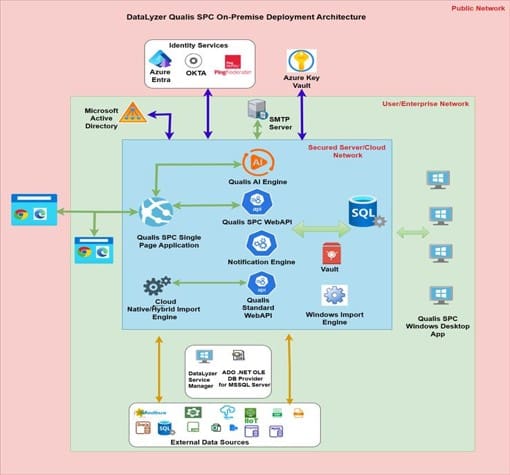
Figure 3: Modern manufacturing environments rely on many different systems. Integrating your SPC solution with some of these systems can increase efficiency and visibility.
Last and not least you may need access to historic data. In many environments you need up to 15 years of archived data. This is almost impossible if all these sheets are stored on local PCs, network drives all with their own structure and organization. It is not uncommon in these situations studies have been repeated multiple times because someone left the company an d the files are lost.
Changing the Culture
Statistical Process Control does not just mean plotting your quality data on control charts. For SPC to be successful, and provide the tremendous value that it offers, it must be an integral part of your organization’s culture. It is important to be systematic in your implementation of SPC principles. You should start small and focus on the easy wins. Pick critical-to-quality characteristics first.
An SPC solution should enable you to quickly calculate control limits from the data, enable statistical alarms, and require cause and action codes or notes. Management should be able to monitor progress about the continuous improvement process.
It is important not to overwhelm the operators with alerts and alarms or complicated charts. An SPC system should be designed so that incremental changes can be made as the process matures and as the culture slowly changes. Excel is simply too cumbersome to efficiently manage the adaption of SPC within an organization’s manufacturing processes.
Conclusion
While Excel can be a good tool to get started with understanding your processes capabilities, process capability is not the only aspect of Statistical Process Control. It is just the first step. SPC is a real-time tool that empowers your operators and technicians to increase yield, improve product quality, and produce more efficiently. A purpose-built SPC solution with a central data repository is the only means to successfully implementing the cultural change that is necessary to reap the benefits of SPC. The question if you can do SPC in Excel or an Excel based SPC software is basically the same as asking if you can do your bookkeeping in Excel.
9%
Cost Reduction Achieved by customers


What customers say
“Datalyzer helped us automatically link quality data from all processes for advanced analysis”
Dave Beeren
Yield Engineer, Philips
Industries we serve

ISO Certified
ISO 27001 & SOC2